Recital Planning
Dance Recital Management Software That Keeps Everything Together
A recital isn't just a date on the calendar. It's every student, every class, every routine, every rehearsal time, every costume, and a hundred small parent questions: all happening at once, in the weeks when your studio is busiest. Dance Director keeps those pieces connected instead of scattered across spreadsheets, group texts, and sticky notes.
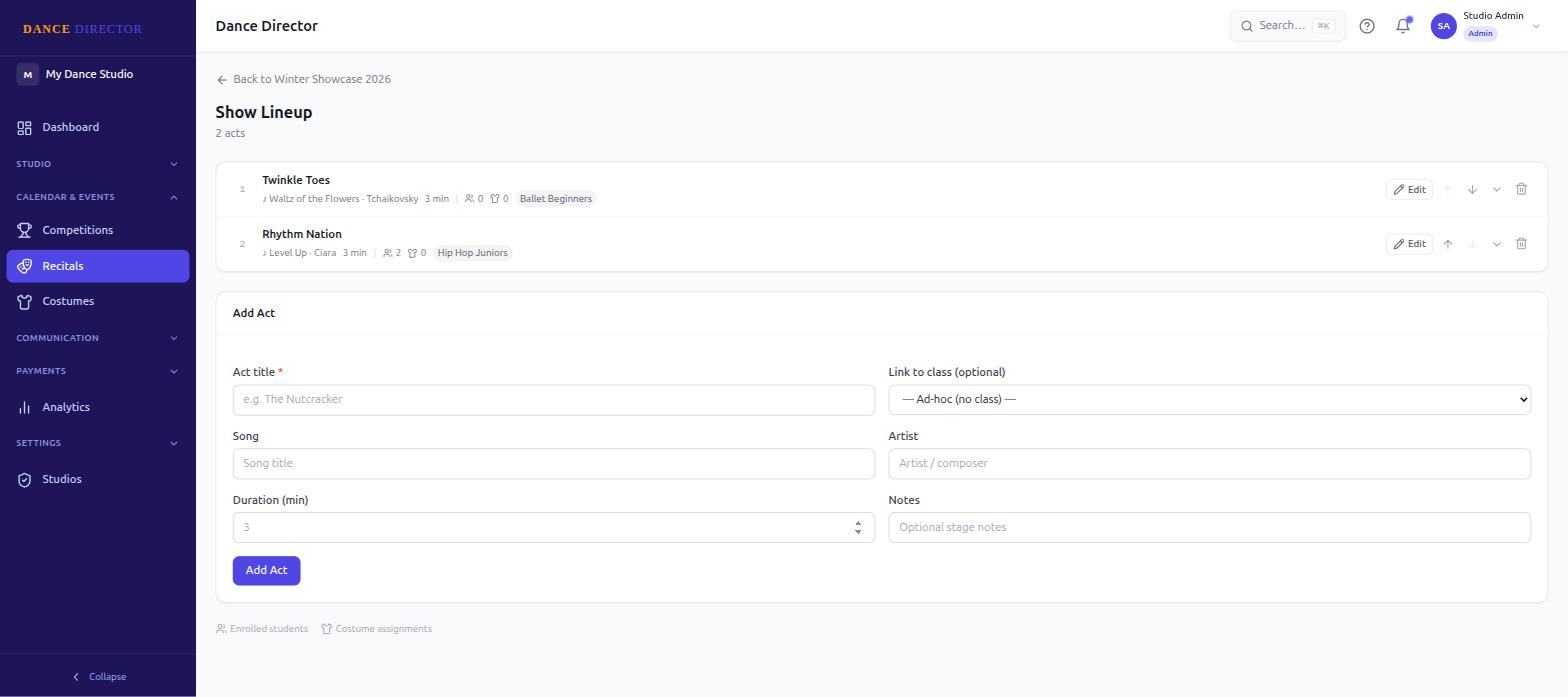
Plan the Recital in One Place
Building a recital lineup usually starts in one document and ends up split across three. Dance Director keeps the whole show in the same system you already use for classes and students.
- Recital planning — Build out your show from the same platform that holds your class and student data.
- Performance lineups and order — Set the running order for the show, with songs and artists attached to each performance.
- Class-based and individual performances — Plan group numbers tied to a class roster, or individual student performances, in the same lineup.
Keep Rehearsals Organized
Recital season means rehearsals stacked on top of your normal class schedule — different rooms, different times, sometimes a different venue entirely. Dance Director gives each rehearsal its own record instead of a line in a group text.
- Full rehearsal details — Date, time, room, and venue all live with the rehearsal itself.
- Rehearsal notes — Add context staff and instructors need — what to bring, what's changed, what to expect.
- Individual student assignments — Assign specific students to a rehearsal when it's not a full-class call, so families know exactly who needs to be there.
Make Sure Parents Know Where Their Dancer Needs to Be
"What time is my daughter's rehearsal?" is the question every studio owner answers a dozen times during recital season. Dance Director's parent communication tools are built to answer it before it's asked.
- Recital messages — Send updates specific to the recital, separate from your studio's everyday announcements.
- Schedule updates — When a rehearsal time or room changes, the update goes to the families it actually affects.
- Pinned messages — Keep the details that matter most — call times, arrival instructions — visible instead of buried under newer messages.
Keep Costumes Connected to Students
A costume assignment that lives in a separate spreadsheet from your recital lineup is a costume assignment that's easy to lose track of. Dance Director keeps costume assignments tied directly to the student and the performance they belong to.
- Recital costume assignments — Assign a costume to a student for a specific recital performance.
- Sizing on the student record — Costume and apparel sizing lives with the rest of the student's profile.
- Costume billing — Charge for costumes through the same billing your studio already uses for tuition.
For a closer look at how costume tracking works across your whole studio — not just for recitals — see dance studio costume management.
Sell Recital Tickets Online
Once your lineup is set, ticket sales are part of the same system — not a separate box-office tool you have to reconcile against your recital roster. Studios can set up recital ticket types, sell tickets publicly or to parents only, and manage capacity as seats sell.
Ticketing has enough moving parts to deserve its own guide — see dance recital ticketing for the full breakdown of how ticket sales work.
Communicate Changes Without Endless Email Threads
Recital details change — a rehearsal moves, a call time shifts, a costume note gets added. When that happens over email, half the families miss it, and your inbox turns into a support queue. Dance Director's messaging keeps recital communication threaded, tracked, and visible with read receipts, so you know who's actually seen an update instead of guessing.
One System From Classes to Curtain Call
The lineup, the rehearsal schedule, the costume assignments, the ticket sales, and the messages that hold it all together — none of it lives in a separate tool. It's connected to the same student, class, and family records your studio already runs on every other day of the year.
Studios that also run competition teams use the same system for that season too — competition entries, rehearsals, and records sit alongside recital planning, not in a second piece of software.
Recital planning is one part of a bigger picture — see the full list of Dance Director features to see how it fits with billing, registration, and everything else your studio runs.
Frequently Asked Questions
Does Dance Director handle recital ticket sales?
Yes. Studios can set up recital ticket types, sell publicly or to parents only, and manage ticket capacity through Dance Director. See our dedicated guide on recital ticketing for a closer look at how ticket sales work.
Can I assign costumes to specific recital performances?
Yes. Costumes can be assigned per student and tied to a specific recital performance, so the costume record stays connected to the routine it belongs to, not tracked separately in a spreadsheet.
Can I organize rehearsals by date, time, and room?
Yes. Recital rehearsals can be scheduled with a date, time, room, and venue, along with notes and individual student assignments, so everyone knows where they need to be and when.
Does Dance Director also handle dance competitions?
Yes. Competition entries, rehearsals, and records live in the same system as recital planning, so studios that do both don't need a separate tool for competition season.